
Every IGNOU assignment must begin with a proper cover page (also called the front page). This cover sheet contains crucial information that identifies your work and ensures it’s evaluated correctly. If you’re a first-time IGNOU student or even submitting final-year assignments, understanding the correct cover page format is essential. Below is a comprehensive guide on the IGNOU assignment cover page – covering its importance, latest format, how to fill it out, and answers to common questions. This applies to all major programs, from BA and B.Com to MA, MBA, M.Com., B.Ed, BCA, MCA, and more.
Download IGNOU Solved Assignment for all IGNOU’s Courses (Latest Session) in Soft-Copy (PDF): Click Here
What Is an IGNOU Assignment Cover Page?
The IGNOU assignment cover page is the first page attached to each assignment you submit. It acts as an identification sheet for your assignment. On this front page, you provide key details about yourself and the assignment (such as your name, enrollment number, course, etc.). This information helps the university and evaluators quickly identify:
- Who submitted the assignment (your name and enrollment number).
- What the assignment is for (which program/course and which attempt).
- Where it should be processed (your study center and regional center details).

Why is it important? Without a correctly filled cover page, your assignment can be misplaced, rejected, or remain uncredited. The cover page ensures the evaluator can trace your work back to you and record your marks properly. In short, it’s a mandatory part of every IGNOU assignment and a simple yet crucial step to avoid administrative errors.
Must Read: IGNOU Solved Assignment
IGNOU Assignment Cover Page Format (Latest Requirements)
IGNOU provides a standard cover page format that all students should use. The latest format hasn’t changed much from previous years – it still requires all the key personal and course details. You can use a pre-formatted template or neatly recreate it on a plain A4 sheet. All entries on the cover page should be filled out carefully. Below are the details you must include on an IGNOU assignment cover page:
- Student’s Full Name: Your name as per IGNOU records.
- Enrollment Number: Your 9 or 10-digit IGNOU enrollment ID.
- Programme Code & Title: The code of your program (e.g., BAG for BA General, MCOM for Master of Commerce, MBA for Master of Business Administration, etc.) along with the full program name.
- Course Code & Title: The course code (e.g., BEGC-101, BCOC-132, MMPC-008) and the course name associated with the assignment.
- Assignment Number: The assignment’s number or code. For example, it might be Assignment 1 for that course or a specific code given in the assignment question paper (often labeled as TMA or assignment code).
- Study Centre Code (and Name): The code of your IGNOU Study Centre where you’ll submit the assignment. You may also write the study center’s name and address if space allows.
- Regional Centre: If required, mention your Regional Centre or its code (usually the study centre code already indicates this, but some formats include a separate line for Regional Centre).
- Student’s Address: If applicable, some cover page formats include your personal address. Check your regional center’s guidelines – if an address field is there, provide your correspondence address.
- Contact Details: Your Phone number and Email ID (ensure these are current, as some updated cover page formats request contact info for records).
- Session & Year: The academic session for which the assignment is submitted. For example, write “July 2025 – January 2026” or simply “July 2025” if you’re submitting for the December 2025 Term End Exam. Similarly, “January 2026” would indicate the June 2026 TEE session. This helps indicate the cycle (June TEE or December TEE) relevant to your assignment.
- Date of Submission: The actual date you plan to submit or dispatch the assignment.
- Student’s Signature: Your signature, confirming the work is yours and the details are correct. Always sign in ink (if printing the cover page, sign it by hand after printing).

Ensure all details are accurate and legible. Double-check things like your enrollment number, course code, and study centre code, as any mistake in these can lead to confusion in grading. Do not leave any field blank. If something isn’t applicable, it’s better to write “N/A” than to leave it empty.
Tip: Use capital letters (uppercase) for critical entries like your name, enrollment number, program and course codes – this improves readability. Also, use a blue or black pen if you are handwriting the details.
IGNOU Assignment Cover Page Template and Sample (PDF/Word)
To make things easier, IGNOU and various study centers provide a blank cover page template that you can download and print. This template is usually available as a PDF (for print) or sometimes in Word (DOCX) format (which is editable). The official format is the same nationwide, so a single template works for all courses and programs.
How to get the template: Visit the official IGNOU website or your Regional Centre’s website – they often have a link for “Assignment Front Page” or “Assignment Cover Page” download. Alternatively, many student portals and forums share the IGNOU assignment cover page PDF for each year. The 2026 cover page format is expected to be identical to the 2025 format, so if you find a “latest cover page template”, it should suffice for the 2025-26 session and beyond.
Using the template: Once you download the IGNOU assignment cover page PDF, you can print it out on an A4 sheet. Fill in the required entries by hand (neatly). If you have a Word format template, you can type in your details, but remember to sign the page after printing. Using the official template ensures you don’t miss any required fields, as all the headings will be pre-listed (Name, Enrollment No., Course Code, etc. as mentioned above).
If you don’t have a printer or prefer to do it yourself, you can hand-draw the format on a blank A4 paper following the order of details given in the list above. Keep the layout clean: usually, each item is on a separate line with a label (e.g., “Enrolment No: _________”).
Sample IGNOU assignment cover page: A correctly filled sample would look like a form with your information inserted. For instance, after filling, the top of your cover page might read:
- Enrolment No: 1234567890
- Name: Your Full Name
- Address: Your Address (if required)
- Program: BCA (Bachelor of Computer Applications)
- Course Code: MCS-011
- Course Title: Problem Solving and Programming
- Assignment No: Assignment 1 (2025-26)
- Study Centre Code: 0705 (and perhaps the center name)
- Phone No: 9876543210
- Email ID: youremail@example.com
- Date: 31-03-2026 (with your signature next to it)
Make sure your cover page is neat and readable. A poorly filled or messy front page can create a bad impression and may even lead to errors in recording your marks.
IGNOU Assignment Cover Page (Handwritten vs Printed): Which Is Required?
One common doubt is whether the cover page needs to be handwritten or if it can be printed. IGNOU accepts both handwritten and printed cover pages, but there are some recommendations:
- ✍️ Handwritten: A handwritten cover page (you write all details with pen) is often preferred by IGNOU. This is because it’s personal and reduces the chance of identical copies or forgery. If you write by hand, do so clearly and neatly. Use block letters for clarity and avoid cursive writing that might be hard to read. Even if the rest of your assignment is handwritten (as is usually required), you can confidently handwrite the cover page too.
- 🖨️ Printed: You are allowed to type your details into a cover page template and print it out, or print a blank template and fill it in. A printed cover page looks tidy as long as the information is correct. However, make sure to sign it manually – a digital signature is not acceptable. Also, if you print a blank form, fill it in with pen rather than leaving it typed, unless your regional centre explicitly allows fully typed submissions.
In summary, either method is acceptable. For consistency, many students print the blank format and then handwrite their specifics. This gives a clean structure with a personal touch. Remember that ultimately the information must be correct and legible – that matters more than the method. If you do choose to print a filled cover page, double-check all printed details and still add your signature in ink. IGNOU’s general advice leans toward handwritten entries for authenticity, but a well-printed cover page will not be rejected as long as it meets the format requirements.
How to Fill Out the IGNOU Assignment Cover Page (Step-by-Step)
Filling in the IGNOU assignment cover page is straightforward, but you should do it carefully. Here’s a step-by-step guide to ensure you complete every entry properly:
- Obtain the Format: First, get the cover page template – either download and print it, or draw the outline on a blank A4 sheet as per the required format. Make sure you have all the fields listed (Name, Enrollment No, Program, Course, etc.).
- Use Clear Writing: If handwriting, use a blue or black pen and write in capital letters for key fields. If typing in a digital form, use a clear font (like Arial or Times New Roman) at a readable size (12pt) and print on A4 paper.
- Fill Personal Details: Start by writing your Name exactly as it appears in your IGNOU records and ID card. Next, fill in your Enrollment Number carefully (double-check each digit). Fill your Program Code and Title (e.g., “MCA – Master of Computer Applications”). If the form has a line for address, write your full address neatly across the provided space or lines.
- Fill Course and Assignment Details: Write the Course Code and the Course Title for the assignment you’re submitting (you can find the exact course title in your study materials or assignment question paper). Then specify the Assignment Number/Code – e.g., “Assignment 2” or the code given in the assignment sheet (such as “TMA-02” if mentioned). Ensure this corresponds to the correct course.
- Study Centre and Session: Enter your Study Centre Code (and name if required). This code is in your student ID or admission documents, and it’s usually also indicated on your assignment question paper or guidelines. Then note the Session/Year – for example, “January 2026” for the assignments submitted for the June 2026 TEE, or “July 2025” for the December 2025 TEE. Including month and year is important for the evaluators to know which cycle your assignment belongs to.
- Contact Information: Provide your Mobile Number and Email ID if the cover format includes these. This is straightforward – just ensure you use an active phone number (with country code if required) and a professional-sounding email (avoid jokey emails; use your name if possible).
- Date and Signature: Finally, put the date of submission (the day/month/year you are submitting the assignment). Sign in the designated space (usually next to or below the date). Use the same pen for signature – and remember no digital signatures; sign by hand.
- Review All Entries: Before attaching the cover page, re-check every detail. Confirm that the course code you wrote matches the assignment, the program code is correct, and all numbers (enrollment, center code, phone) are accurate. Also ensure nothing is left blank; every field should have an entry or a dash/N.A. if not applicable.
- No Extra Decorations: Keep the cover page simple and formal. Do not add any decorative borders, images, or quotes. IGNOU has a strict format, and adding extra design elements or using colored paper can lead to rejection. Use a plain white A4 sheet (if printing, standard office paper is fine).
- One Course = One Cover Page: Remember that you need a separate cover page for each course’s assignment. If you are submitting multiple assignments (for different courses), each should have its own front page attached. Never attempt to cover multiple courses with one cover page by listing them together – it’s not acceptable.
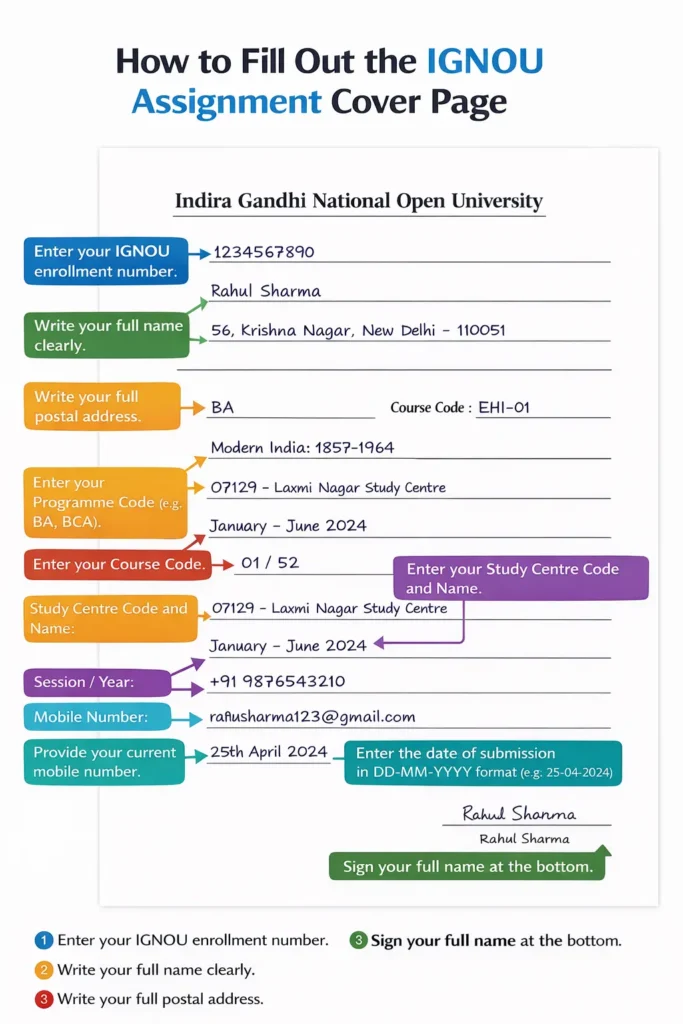
By following these steps, you’ll fill out your assignment front page correctly. Taking a few minutes to do this diligently can save you from big problems later, such as ungraded assignments due to missing or wrong information. It’s a small but vital part of your assignment submission process.
IGNOU Assignment Cover Page for Offline vs. Online Submission
IGNOU assignments can typically be submitted offline (physical copies to your Study Centre) and, in some cases, online (via email or upload, as per special provisions or regional center directives). The IGNOU assignment cover page is required in both cases, but the way you handle it differs slightly:
- Offline Submission (Study Centre): Print out your completed assignment (or use the handwritten pages) and attach the cover page on top of each assignment. Use a stapler or a thin thread binding to secure all pages together, with the cover page as the first page. Avoid fancy binding or plastic folders – most centers prefer simple stapled sets or tied with a thread. The cover page should be clearly visible as soon as the evaluator picks up your assignment. When you hand it in at the study centre, they may stamp or sign on your cover page as acknowledgment. If you have multiple courses, keep each course’s assignment separate, each with its own cover page.
- Online Submission (Email/Portal): If IGNOU or your regional centre allows online submission (this was introduced during certain periods or for convenience in some cases), you will be sending your assignment digitally. In such cases, you should scan your written assignment or save your typed work as a PDF, and include the cover page as the first page of the PDF file. Essentially, arrange your document so that page 1 is the filled cover page (you can fill it, sign, then scan it along with your answers). If submissions are via email, attach the PDF (with cover page included) and subject line per instructions. For online portal uploads, follow their file format guidelines, but ensure the cover page is part of the file. Even though it’s digital, the same cover page details are mandatory. Tip: After scanning, check that the cover page is clearly readable in the PDF (especially your enrollment number and codes).
- Acknowledgment: For offline submissions, always get a receipt or signature from the center on a copy of the cover page or on an acknowledgment form – this is proof of submission. For online, keep the sent email and any confirmation from the receiver as proof. The cover page information will help if you need to track your assignment later.
No matter the mode of submission, the cover page format does not change. Online submission is essentially sending a digital version of what would have been a physical bundle. The evaluators will see the same front page details to log your assignment. Do not skip the cover page for online submissions thinking it’s digital – that could lead to your assignment being disregarded. Always include it as page one.
Must Read: IGNOU Assignment Result: Check Marks, Update, Status
IGNOU Assignment Cover Page Format for All Programs and Courses (BA, MA, B.Com, MBA, M.Com., etc.)
Students across all IGNOU programs must use the assignment cover page; its core format is universal. Whether you’re pursuing a bachelor’s degree like B.A., B.Com, B.Sc., a master’s like M.A., M.Com, M.Sc., or professional courses like MBA, B.Ed, BCA, MCA, the same cover page requirements apply. There is no separate design for each program – you fill in the template with your specific program and course details, but the structure remains the same.
For example:
- A BA student (Program code BAG for the CBCS BA programme) will write “BAG” and the program name (Bachelor of Arts) under Programme, and maybe their specialization if needed. Their course might be, say, BEGLA-135 (English in Daily Life), which they’ll put as Course Code along with the course title.
- An MBA student will put “MBA” as the program (or the specific MBA specialization code if any) and include their course code like MMPC-008 (Financial Management) with the title.
- A B.Com or M.Com student similarly uses BCOMG or MCOM as the program code, respectively, and the relevant course code (e.g., BCOC-132 for a B.Com course, or MCO-01 for an M.Com course).
- BCA/MCA students also follow suit (e.g., BCA program, course code BCS-040).
- Even certificate or diploma programs use the same cover page style – just fill in your certificate program code and the course details.
The cover page doesn’t change with the level of course; it only changes the content you fill in (the codes and titles unique to your course). Every assignment for every course must have its own front page attached. So if in a semester you have four courses with assignments, prepare four separate cover pages (one for each assignment submission).
Term-End Examination (TEE) Assignments: IGNOU assignments are tied to the Term End Exams (June and December cycles). Regardless of whether it’s for June TEE or December TEE, you use the same cover page format. Just be sure to indicate the correct session (Jan–June or July–Dec) as discussed. There isn’t a different cover page for different terms or years – the 2026 assignment cover page format is the same “latest format” everyone uses, which is essentially the standard format used in previous years with all the fields listed above.
In summary, don’t worry about program-specific cover pages. Focus instead on correctly inserting your program’s information into the standard template. This consistency helps IGNOU manage the avalanche of assignments from thousands of students by having uniform information on top of each submission.
FAQs on IGNOU Assignment Cover Page
What is an IGNOU assignment cover page?
It is the first page attached to every assignment. It contains student and course details so the assignment is identified correctly during submission and evaluation.
What is the IGNOU assignment cover page format (latest)?
It includes name, enrolment number, programme code, course code, assignment number, study centre code, session, submission date, contact details (if asked), and signature.
Where to get an IGNOU assignment cover page PDF?
It is usually available as an IGNOU assignment cover page PDF on student support pages and regional or study centre notice boards. Use the latest format and print on A4.
How to fill IGNOU assignment cover page entries correctly?
Write details exactly as per records: correct enrolment number, programme code, course code, and study centre code. Use clear handwriting, avoid blanks, add the correct session, and sign.
Is the IGNOU assignment cover page handwritten or printed?
Both are generally accepted. Print the template if needed and fill entries neatly, but the signature must be handwritten. A fully handwritten cover page is also acceptable.
Can the same cover page template be used for BA, MA, B.Com, MBA, B.Ed, BCA, and MCA?
Yes. The IGNOU assignment cover page template is common for all programmes. Only the programme code and course code details change.
Conclusion
The IGNOU assignment cover page might seem like a small formality, but it is a critical part of your submission. By following the official format and filling in all details accurately, you ensure your assignment is identifiable and processed without delays. Remember that assignments without a proper cover page can be rejected or remain ungraded, so never skip this step.
As a quick recap, always include your name, enrollment number, program/course details, study centre, session, date, and signature on the front page. Use the latest cover page template (2025-26) for guidance, write neatly (or type and print clearly), and double-check everything. Attach the cover page on top of your assignment before submitting it to the study centre or uploading it online. Each course’s assignment gets its own cover page – no exceptions.
By taking care to prepare a complete and correct cover page, you present yourself as an organized and serious student. It sets the tone for the evaluator even before they read your answers. Along with good content in your answers, a well-prepared assignment with the right cover page will help you get the credit you deserve without any administrative hassles. Good luck with your IGNOU assignments!
Need Help with Your IGNOU Assignment Cover Page?
Facing challenges with IGNOU assignment formatting or content? You’re not alone. For additional guidance, expert tips, or assistance in preparing IGNOU assignments and project reports, you can turn to ignouproject.com or WhatsApp us. This platform offers support to IGNOU students – from providing the latest templates to helping you understand assignment guidelines.
If you want to ensure your assignments are on the right track, ignouproject.com is ready to help you succeed in your academic journey. Reach out and make your IGNOU experience smoother and more confident.

BK Sahni iD 0009-0005-8092-459X
Founder, Shri Chakradhar Publication Pvt. Ltd. & ignouproject.com — helping IGNOU distance-learning students since 2010 (5,00,000+ students supported across MBA, MCom, MA & more). Author of IGNOU exam guides, solved assignments & project reference books.
Disclosure: Shri Chakradhar Publication Pvt. Ltd. and ignouproject.com are independent third-party study-help services — not the official IGNOU website. Always verify final dates and rules on ignou.ac.in.