IGNOU assignment submission is an important academic requirement for students appearing in the June or December Term-End Examination. In 2026, students may need to submit their assignments online or offline, depending on their Regional Centre, Study Centre, programme, and official instructions. Therefore, before submitting, students should carefully check the latest notice issued by their own Regional Centre.
IGNOU also provides current assignments through its official assignment portal, where learners can search by programme code or course code and check assignment validity before downloading the question paper.
Latest Update: As per IGNOU’s Student Evaluation Division notification dated 04th May 2026, the last date for assignment submission for June 2026 TEE was extended up to 31st May 2026 for ODL and Online programmes, including both hard copy and soft copy submission.
Quick Answer: To submit IGNOU assignment online in 2026, visit your Regional Centre assignment submission link, upload handwritten scanned PDFs course-wise, enter enrollment and programme details, and save acknowledgement proof. For offline submission, submit handwritten hard copies at your allotted Study Centre or Regional Centre before the official deadline.
Quick Links:
- IGNOU Assignment Submission Portal
- Check IGNOU Assignment Status
- Check IGNOU Assignment Last Date 2026
- Download IGNOU Assignment Question Papers
IGNOU Assignment Submission 2026: Quick Overview
| Point | Details |
| University | Indira Gandhi National Open University |
| Submission modes | Online or offline, depending on Regional Centre or Study Centre |
| Assignment format | Usually handwritten; scanned PDF may be required for online mode |
| Required details | Enrollment number, programme code, course code, study centre, session |
| Proof needed | Online acknowledgement, email confirmation, or offline receipt |
| Official assignment download | IGNOU Current Assignments portal |
| Status check | IGNOU Assignment/Project/Practical Submission Status portal |
Students should always download the correct assignment from the official IGNOU Current Assignments page and verify the validity/session before writing answers.
What Is IGNOU Assignment Submission?
IGNOU assignment submission means submitting solved assignments for the courses registered in a particular session. These assignments are part of the academic evaluation process and must be submitted before the Term-End Examination deadline.
Students should not use old or expired assignment papers. Instead, they should search the official portal using their programme code or course code and confirm the assignment validity before downloading.
IGNOU Assignment Submission Last Date 2026
For June 2026 TEE, IGNOU officially extended the assignment submission date up to 31st May 2026 for both hard copy and soft copy submissions under ODL and Online programmes.
However, this does not mean every student should submit through the same link or the same method. Regional Centres may issue separate instructions for online forms, email submission, or offline hard-copy submission. Therefore, students must check their own RC or Study Centre notice before final submission.
Important: Do not wait for the last day. Online links may close, file uploads may fail, and offline centres may have limited working hours.
How to Download IGNOU Assignment Question Papers
Follow these steps before writing the assignment:
- Visit the official IGNOU Current Assignments portal.
- Search by programme code or course code.
- Check the validity/session carefully.
- Download the assignment PDF.
- Read the instructions given in the assignment file.
- Write answers neatly in your own handwriting unless your programme instructions say otherwise.
IGNOU’s official assignment page specifically advises learners to search by programme/course code and check validity before downloading.
Students who need reference help while preparing answers can also check our updated IGNOU solved assignment guide for course-wise support before final submission.
IGNOU Assignment Front Page Details Required
Every assignment should have a proper front page. Missing or incorrect details may create problems during evaluation or marks updating.
Include these details:
- Student name
- Enrollment number
- Programme code
- Course code
- Course title
- Study Centre code
- Regional Centre
- Session/year
- Mobile number
- Email ID
- Student signature
Download IGNOU Assignment Front Page PDF before writing your final copy.
How to Submit IGNOU Assignment Online 2026
IGNOU assignment online submission is usually managed through Regional Centre or Study Centre-specific links. There is no single universal online submission link for every learner. For example, IGNOU Delhi-3 Regional Centre has a dedicated page for online assignment submission for June 2026 TEE and clearly advises learners of other Regional Centres not to submit assignments under Delhi-3.
Step-by-Step Online Submission Process
- Visit your official Regional Centre website.
- Find the latest assignment submission notice or upload link.
- Read the instructions for your programme and Study Centre.
- Scan your handwritten assignment clearly.
- Convert each course assignment into a separate PDF, if required.
- Fill in enrollment number, name, programme code, course code, email ID, and mobile number.
- Upload the correct assignment PDF.
- Submit the form or email as instructed.
- Save the acknowledgement, email receipt, screenshot, or confirmation message.
- For online courses, submit via the official LMS Portal.

Step-by-Step IGNOU Assignment Online Submission Process
How to Submit IGNOU Assignment Offline 2026
IGNOU assignment offline submission means submitting physical handwritten assignments at the allotted Study Centre or Regional Centre. This method is still commonly used for many ODL learners.
Step-by-Step Offline Submission Process
- Prepare handwritten assignments for each course.
- Attach the front page to every assignment.
- Arrange pages in correct order and staple or bind them properly.
- Visit your allotted Study Centre or Regional Centre.
- Submit assignments before the deadline.
- Collect a stamped receipt or acknowledgement slip.
- Keep the receipt safe until marks are updated.
Warning: Never submit assignments to a random Study Centre. Submit only according to your allotted Study Centre or Regional Centre instructions.
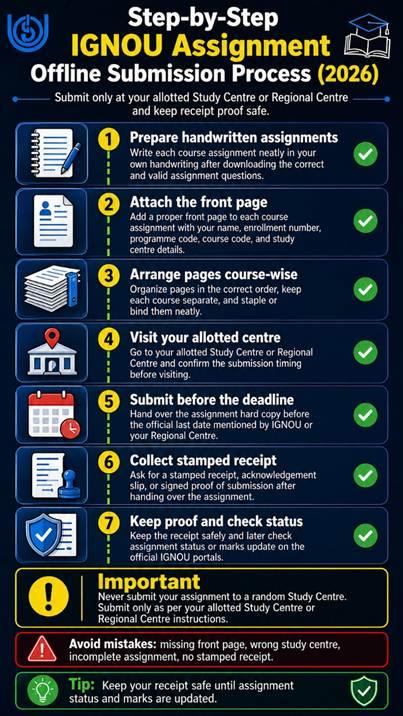
Step-by-Step IGNOU Assignment Offline Submission Process
Online vs Offline IGNOU Assignment Submission
| Factor | Online Submission | Offline Submission |
| Mode | Upload PDF, email, or Google Form | Physical hard copy |
| Proof | Email/form acknowledgement | Stamped receipt |
| Best for | RCs accepting online submission | Study Centre-based learners |
| Main risk | Wrong RC link, file-size issue, blurry scan | Lost receipt, late visit, wrong centre |
| Student action | Check RC notice carefully | Confirm Study Centre timing |
Both methods are valid only when accepted by your Regional Centre or Study Centre.
Watch: IGNOU Assignment Submission — Video Walkthrough
Reading each step is helpful, but watching the submission done on screen makes the process far easier to follow. This video is a visual walkthrough of submitting IGNOU assignments online and offline — how to scan and arrange the PDF, where to upload on the Regional Centre link, and how to save your acknowledgement proof. Watch it alongside the step-by-step guide above, then submit through your own allotted Study Centre or Regional Centre.
Assignments carry 30% of your final result, so what you submit matters as much as how you submit it. Get subject-wise IGNOU solved assignments for the current session, or order a submission-ready handwritten assignment set. To order, message on WhatsApp: +91 93546 37830.
IGNOU Assignment PDF Format for Online Submission
For IGNOU assignment online submission, students should follow clean PDF formatting. Poor scanning may delay evaluation or create confusion.
Use these basic rules:
- Scan the handwritten assignment clearly.
- Use one course assignment per PDF, if instructed.
- Keep handwriting readable.
- Avoid dark, blurry, tilted, or cropped images.
- Add the front page at the beginning of each PDF.
- Use a simple file name such as EnrollmentNumber_CourseCode.pdf.
- Do not upload typed assignments unless your RC or programme allows it.
- Keep your submission acknowledgement safely.
Before scanning your pages, make sure your IGNOU handwritten assignment is neat, readable, properly arranged course-wise, and includes the correct front page details.
Common Mistakes Students Must Avoid
Many students face problems not because their answers are wrong, but because their submissions are incorrect. Avoid these mistakes:
- Downloading an old assignment question paper.
- Ignoring assignment validity/session.
- Submitting through the wrong Regional Centre link.
- Writing an incorrect enrollment number.
- Uploading unreadable or incomplete PDF files.
- Combining all courses into one PDF when separate upload is required.
- Forgetting to attach the front page.
- Not saving acknowledgement proof.
- Missing the last date.
- Not checking assignment status later.
Get the IGNOU Assignment Submission Checklist before final upload or offline submission.
How to Check IGNOU Assignment Submission Status
Students can check IGNOU assignment status through the official Assignment/Project/Practical Submission Status portal by entering their enrollment number and programme code.
After evaluation, assignment marks may also appear in the IGNOU Grade Card portal, where students select the grade card category, programme code, and enrollment number.
Students should remember that status updates may take time. Submission proof is important until the marks are reflected correctly.
Check your IGNOU Assignment Submission Status through the official IGNOU portal: Click on Link
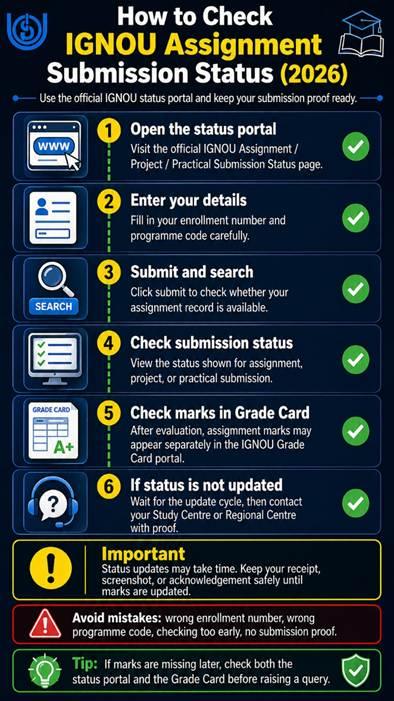
Checking IGNOU Assignment Submission Status
What to Do If IGNOU Assignment Status Is Not Updated?
If the IGNOU assignment status is not updated, do not panic immediately. Follow these steps:
- Wait for the normal evaluation and upload cycle.
- Keep your submission receipt or online acknowledgement ready.
- Contact your Study Centre first.
- If needed, contact your Regional Centre.
- Share enrollment number, programme code, course code, submission date, and proof.
- Do not resubmit unless the Study Centre or Regional Centre instructs you.
In most cases, delays happen due to evaluation, data entry, or marks-upload processing.
Expert-Reviewed Note & Disclaimer
This guide is prepared for educational support and student awareness. It is not the official IGNOU website. Students must verify final instructions, deadlines, and submission methods from their own Regional Centre, Study Centre, or official IGNOU notices.
Frequently Asked Question
Can I submit IGNOU assignment online in 2026?
Yes, but only if your Regional Centre or Study Centre allows online submission. Always use the official RC link or instructions.
Can I submit IGNOU assignment offline?
Yes. Many students submit handwritten hard copies at their allotted Study Centre or Regional Centre.
What is the last date for IGNOU assignment submission 2026?
For June 2026 TEE, IGNOU extended the assignment submission date up to 31st May 2026 for ODL and Online programmes.
Where can I download IGNOU assignments?
Students can download current assignments from the official IGNOU Current Assignments portal by searching programme code or course code.
Is IGNOU assignment handwritten or typed?
Generally, IGNOU assignments are handwritten. Typed assignments should be used only if your programme or RC specifically permits them.
Final Note
IGNOU assignment submission in 2026 can be simple if students follow the correct process. First, download the valid assignment from the official portal. Then, check whether your Regional Centre accepts online or offline submission. Prepare a clear handwritten assignment, attach the front page, submit before the deadline, and keep proof safely.
For a smooth experience, always verify the latest notice from your own Regional Centre or Study Centre before submitting.

BK Sahni iD 0009-0005-8092-459X
Founder, Shri Chakradhar Publication Pvt. Ltd. & ignouproject.com — helping IGNOU distance-learning students since 2010 (5,00,000+ students supported across MBA, MCom, MA & more). Author of IGNOU exam guides, solved assignments & project reference books.
Disclosure: Shri Chakradhar Publication Pvt. Ltd. and ignouproject.com are independent third-party study-help services — not the official IGNOU website. Always verify final dates and rules on ignou.ac.in.