IGNOU MLIL 007 Practical: how the programming lab runs from first session to viva
The IGNOU MLIL 007 Practical asks you to write, compile and run your own programs in a single language of your choice (C++, Java or Visual Basic), first for the TMA-P done at your centre and later in a timed term-end paper that closes with a viva.
MLIL-007 in brief for PGDLAN learners
For the IGNOU MLIL 007 Practical, choose C++, Java or Visual Basic, practise that language’s sessions in the lab manual, and build every program in six steps: read, plan, type, compile, test, save. The TMA-P is done and marked at your centre; the exam sets two questions of 20 marks in two hours, plus a 10-mark viva.
MLIL-007 is the lab half of MLI-007 Programming, and the PGDLAN programme overview shows where it sits. The Programme Guide gives the IGNOU MLIL 007 Practical 60 practical hours and teaches the diploma in English only. This guide covers the doing: method, screens, a worked program and checks.
Learners who handle theory papers with ease can still lock up in front of a blank editor. Repetition cures it, and the MLIL-007 manual gives your language up to ten short sessions of programs to type.
Some learners find out about the lab half of a course only midway through. MLIL-007 arrives with MLI-007 when you register for PGDLAN, so plan lab hours from the first month.
Choose one language, then set up a practice machine
In the IGNOU MLIL 007 Practical, the TMA-P and the exam each take answers in one language only. Recent C++ and Java parts ask for classes, inheritance, overloading, packages and interfaces; Visual Basic asks for forms, menus and button code. Pick the one whose error messages you can read calmly.
The letters differ: in the 2026 TMA-P, Group B is Visual Basic and Group C is Java, while in the exam Part B is Java and Part C is Visual Basic. New to folders and Notepad? See the MLIL 001 practical guide.
Learners from Hindi-medium schooling often say technical English slows them down. Every MLIL-007 question and compiler message is in English, so keep a notebook of error lines and what each meant.
A familiar puzzle: the manual shows Turbo C++ keys, the counsellor uses a newer compiler, a senior swears by a third. For MLIL-007, practise on what your centre has installed, because the TMA-P is marked there.
Late information, lab work needing time and travel, and treating the lab as paperwork trip many learners. In MLIL-007, marks follow a program that runs.
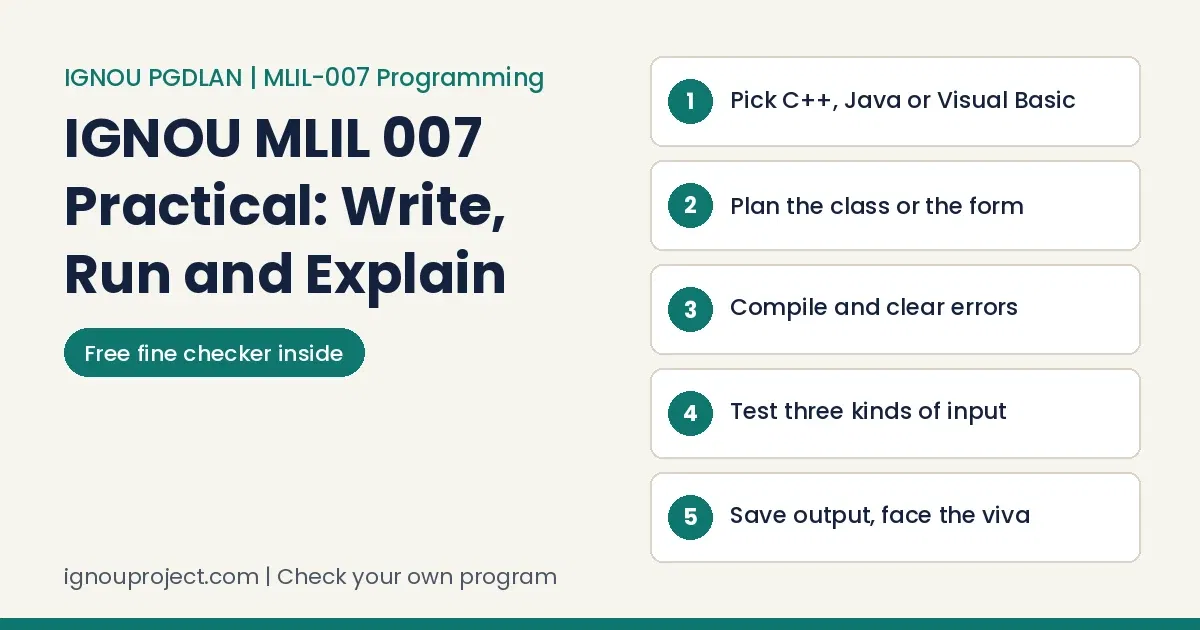
Six steps for any IGNOU MLIL 007 Practical question
Use this order for every IGNOU MLIL 007 Practical program, TMA-P or exam.
Six steps for any question
- Read twice and list inputs, processing and output. Underline every field.
- Plan on paper. For C++ and Java, write the class, its data members and functions; the 2026 TMA-P requires a class. For Visual Basic, sketch the form and name each control.
- Type in small pieces, compiling after each function or event procedure.
- Fix the first error only, then compile again. One missing semicolon can raise ten messages.
- Test three inputs: a normal value, a boundary (day 5 or 10 in a fine question) and an odd one such as zero or an empty box.
- Save source and output. In the exam, show the output, save it on the system and print only where asked.
Learners now ask AI for code before reading the course rules. In MLIL-007 that often misses the TMA-P class rule; do step 2 yourself.
We have seen output typed by hand rather than produced by a run. In MLIL-007 the output must come from your program on the centre system, where the examiner can run it again.
Computer practicals show three faults again and again: no output, output the code could not produce, and code that will not run. Step 5 catches all three.
What changes on the screen in each language
The manual assumes Windows 95 to XP, Turbo C++ on a diskette and Visual Basic 6.0; a few steps change.
Java: save, compile with javac, run with java
Save the source as ClassName.java, spelt exactly like the public class (the manual’s HelloWorldApp). At the prompt, cd to that folder, compile with javac ClassName.java and run with java ClassName. Test the Session 6 adder as java Adder 1 3 2 10; it should print 16. The MLIL 004 network tasks guide walks through the command prompt.
Package program in Java, the Session 9 way
Make a folder calc, start the class inside with package calc; and give it public add, subtract, multiply and divide methods. Put the calculator one folder up, begin it with import calc.*;, and compile and run from there. December 2025 set this with a menu added.
C++ on a current compiler, and the iostream.h error
The manual’s Turbo C++ keys are Alt+C to compile, Alt+R to run, Alt+F5 to view output and F2 to save. Its examples open with #include <iostream.h>, and a standard compiler stops there with an iostream.h error. Write #include <iostream> and add using namespace std; below it.
C++ inheritance program: draw the classes first
Session 9, repeated in June 2025, wants a C++ inheritance program with two base classes (patient name, sex, age; ward, bed, nature of illness) and a derived class adding date of admission. Draw three boxes, then declare class Admission : public PatientData, public WardData, each with input and display functions.
Visual Basic: draw, set properties, write the event code
Choose Standard EXE, draw the controls, set each Name, double-click a button to write its Click code, and press F5 to test. Val() reads a text box as a number. The form saves to its own .frm file.
Code lifted from websites often carries old headers or another compiler’s habits. For MLIL-007, type each manual exercise first and compare outside versions only after yours runs.
Some learners run AI-generated code without reading a line. In MLIL-007 the counsellor and examiner watch it run, and unread code is hard to defend.
Worked example: a library fine program in Visual Basic
A library fine program in Visual Basic appears in manual Session 7 and in both 2025 papers of the IGNOU MLIL 007 Practical with new rates each time, so learn the pattern.
Worked example: Session 7 fine, three slabs
Task: a book is N days late. Manual rates: 40 paise a day for days one to five, 65 paise for days six to ten, 80 paise beyond ten. Form: text box txtDays, button cmdFine, label lblFine.
Private Sub cmdFine_Click()
    Dim n As Integer, fine As Single
    n = Val(txtDays.Text)
    If n <= 5 Then
        fine = n * 0.4
    ElseIf n <= 10 Then
        fine = 5 * 0.4 + (n - 5) * 0.65
    Else
        fine = 5 * 0.4 + 5 * 0.65 + (n - 10) * 0.8
    End If
    lblFine.Caption = "Fine: Rs " & Format(fine, "0.00")
End Sub| N | Working by slab | Output |
|---|---|---|
| 3 | 3 x 0.40 | Fine: Rs 1.20 |
| 8 | 2.00 + 3 x 0.65 | Fine: Rs 3.95 |
| 12 | 2.00 + 3.25 + 2 x 0.80 | Fine: Rs 6.85 |
| 0 | no late days | Fine: Rs 0.00 |
Reading: this code charges each slab at its own rate. Read as one rate for the whole period, 12 days would be Rs 9.60, so state your reading. June 2025 moved the slabs to 10 and 15 days at Rs 2, 4 and 8; December 2025 used 5 and 10 days at Rs 1.50, 2.50 and 3.00. Only the If lines change.
Fine output cross-check
Enter your question’s slabs and rates, then compare with what your program prints.
Without the script: days in each slab times its rate, then add.
The IGNOU MLIL 007 Practical TMA-P, group by group
The TMA-P of the IGNOU MLIL 007 Practical is in the 2026 MLI-007 assignment file: 50 marks, Blocks 2 to 4, Units 4 to 24. The counsellor or practical supervisor provides compilers at your Study Centre or TLC, you write the programs there, and they are marked on the spot. All questions in your group are compulsory. Last dates: 30 September 2026 (January session) and 31 March 2027 (July session).
What each TMA-P group asks you to build
- Group A, C++ (six): a four-option menu; digit sum, product and reverse; ten integers against a given number; prices above an average; a Car class holding an Engine; overloaded areas. Rehearse Sessions 1 to 4, 7 and 10.
- Group B, Visual Basic (five): sum and average until zero; yearly balance on Rs 1000 at 5 percent; sign counts, plainly and with arrays; sum of two 2D arrays. Rehearse Sessions 2, 5 and 6.
- Group C, Java (eight, 5 marks each): object-oriented features; square and cube; bitwise and shift operators; largest of three two ways; two switch menus; Fibonacci; factorial. Rehearse Sessions 1 and 7.
The MLIL 002 SOUL lab guide shows the same centre routine.
In our records, 70 to 80 percent of learners start work only in the final month before a due date. Centre-machine programs cannot be crammed at home, so book MLIL-007 lab slots counting back from the MLI-007 date.
Waiting for an extension is a gamble. The 2026 file prints one date per session, promises no extension, and the programs can only be done at the centre.
A friend at another centre may describe a different routine. For MLIL-007 the compiler, lab days and marking come from the counsellor at your own allotted centre, so ask there.
Where programs go wrong, and the repair
These slips stop many IGNOU MLIL 007 Practical programs from running.
Where programs go wrong, and the repair
| Slip | What you see | Repair |
|---|---|---|
| Java file name differs from the class | javac rejects the public class | Rename the file to match exactly, capitals included |
| javac not found | "'javac' is not recognized" | The JDK bin folder is not on the PATH; ask the centre |
| Empty VB text box | Val returns 0 and a tidy wrong answer appears | Check for an empty box and show a message |
| Off-by-one at a slab edge | Day 10 charged at the third rate | Test boundary days; fix the comparison sign |
| Unsigned paper costs marks. An MLIL-007 printout belongs on the sheet the RD has signed and stamped, never on plain paper. | ||
| Wrong identity details turn up often. On that sheet, confirm the Roll No., Study Centre and exam date match your hall ticket. | ||
| Some learners email work instead of using the course route. The MLIL-007 TMA-P is done and marked at the centre, so emailed code is not the assessed work. | ||
Exam day: two questions in 120 minutes
The IGNOU MLIL 007 Practical paper runs two hours for 50 marks (40 practical, 10 viva voce) at 40 percent weightage. Attempt one Part and both its 20-mark questions; no manual is allowed. The December 2026 exam date sheet stars MLIL007, sending you to your Regional Centre for date and venue. Hall tickets go online 7 to 10 days before; carry your IGNOU Student ID card. See also the IGNOU practical rules for 2026.
Two hours for two questions
- 0 to 10 minutes: read both questions; sketch each class or form.
- 10 to 55: type, compile and test question 1.
- 55 to 100: the same for question 2.
- 100 to 115: save both programs and outputs; print where asked.
- Last minutes: show the output; prepare for the viva.
Before the examiner reaches your desk
Most learners juggle work and family, and missed lab sessions are where a session is often lost. The PGDLAN guide calls the computer practical compulsory, so treat MLIL-007 lab days as fixed appointments.
Lab dates are fixed and usually posted by Regional Centres. For MLIL-007, watch your Regional Centre notices so the starred slot is not missed.
Learners mix up the Rs 300 and Rs 500 practical fees. MLI-007 and MLIL-007 share one 4-credit line, which places the practical in the Rs 300 slab, paid with the exam form.
MLIL 007 viva questions to answer aloud
In the IGNOU MLIL 007 Practical the viva starts from the program on your screen. Rehearse these MLIL 007 viva questions with your code open.
Viva prompts for your own code
- Why is this logic in a class rather than in main alone?
- What does your constructor set up, and when does the destructor run?
- Which members does the derived class inherit, and which does it add?
- Why must the Java file name match the public class?
- What does Val() do, and what happens if the box is empty?
- Which inputs did you test, and what changes if one rate changes?
The MLIL 005 web search guide uses the same drill.
Many treat the viva as a formality. In MLIL-007 it is a fifth of the marks, and a tidy program earns little there if you cannot say why it is built that way.
Ready-made answers circulate, handed in with only the name changed. Matching MLIL-007 programs from one centre stand out, and the viva exposes them.
Learners often ask whether a viva applies. For MLIL-007 yes: all four recent papers print viva voce inside the 50 marks.
Have your own program read before the centre day
Want a check on a practice program? Send your own code and an output screenshot on WhatsApp. We mark lines that will not compile or do not match the question and explain why; you make the changes and remain the author. The check is quoted on WhatsApp; other help is on our services and charges page. We never write or run a learner's TMA-P or exam work.
IGNOU MLIL 007 Practical questions, answered from the files
Three practical questions from PGDLAN learners
Can I do the TMA-P at home and bring the file?
No. The 2026 file says the IGNOU MLIL 007 Practical TMA-P is done at the Study Centre or TLC on compilers the counsellor provides and evaluated on the spot.
Learners are often unsure which office takes which work. For the MLIL-007 TMA-P it is the centre you were allotted, through its coordinator, not the Regional Centre or headquarters.
Which compiler should I install for home practice?
Match your centre. A current JDK follows the manual's Java steps, a standard C++ compiler works once the header is changed, and the VB section assumes version 6.0.
What score clears MLIL-007, and whom do I ask about missing marks?
The Programme Guide asks for at least 40 percent in practicals, weighting continuous evaluation 20 percent and the term-end exam 80 percent. The practical marks contact in the prospectus is practicalsed@ignou.ac.in, phone 011-29572212.
Without an acknowledgement, missing marks are hard to chase. Since the MLIL-007 TMA-P is marked at the centre, ask the counsellor for a signed note of your marks that day.
Practical marks often reach the grade card late. If MLIL-007 matters for a job or admission, query early.
Bringing the IGNOU MLIL 007 Practical together
One language, its sessions in six steps, early lab bookings and edge testing: that is the IGNOU MLIL 007 Practical method. Sibling guides include the MLIL 003 SQL Server guide, and the PGDLAN project guide for MLIP-008 covers the project. For MLI-007 books, see the course page on our publication site.
Those who do well begin early, check rules with their own centre, date each practice session, get each signature on the day and can explain every line. For MLIL-007: one language, your own typed programs.
Official files behind this guide
- MLIL-007 Programming lab manual, read in full.
- PGDLAN Programme Guide, July 2022
- MLI-007 assignment file with the TMA-P, 2026
- MLIL-007 paper, June 2026
- MLIL-007 paper, December 2025
- MLIL-007 paper, June 2025
- MLIL-007 paper, December 2024
- IGNOU Common Prospectus, July 2026
Method: built from the files above, read in November 2026. Drafting was AI-assisted, each rule and figure was checked against those files, and BK Sahni publishes this guide under his editorial responsibility.
ignouproject.com is not affiliated with or endorsed by IGNOU. We explain a learner's own code; the learner remains the author, and the counsellor and examiner decide marks.

BK Sahni iD 0009-0005-8092-459X
Founder, Shri Chakradhar Publication Pvt. Ltd. & ignouproject.com — helping IGNOU distance-learning students since 2010 (5,00,000+ students supported across MBA, MCom, MA & more). Author of IGNOU exam guides, solved assignments & project reference books.
Disclosure: Shri Chakradhar Publication Pvt. Ltd. and ignouproject.com are independent third-party study-help services — not the official IGNOU website. Always verify final dates and rules on ignou.ac.in.