IGNOU MLIL 005 Practical: how the search lab runs from first session to viva
The IGNOU MLIL 005 Practical asks PGDLAN learners to find information on live websites, record what each site returns and keep that output where an examiner can open it. Below, each task type from the 2026 TMA-P and recent papers comes with its clicks, file habits and checks.
The search lab route at a glance
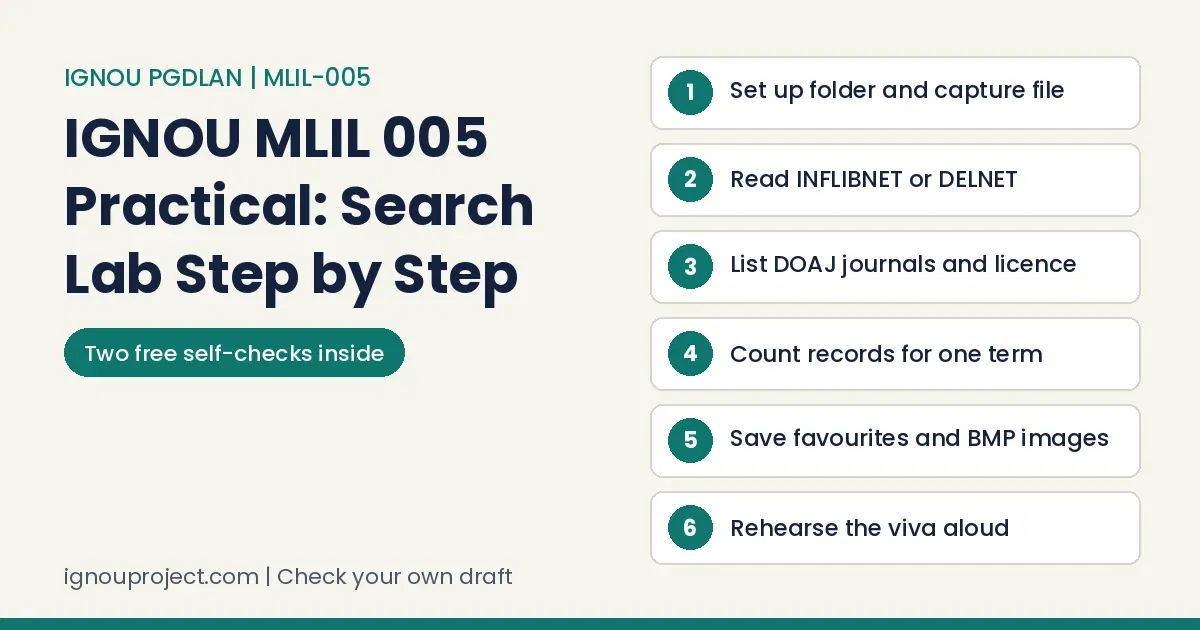
For the IGNOU MLIL 005 Practical, first do the 50-mark TMA-P at your Study Centre or TLC, saving screen captures question-wise in one file. Then sit the two-hour term-end practical: 40 marks of live searching and a 10-mark viva, with every output saved on the lab computer.
MLIL-005 pairs with the MLI-005 theory course (see the PGDLAN programme overview). Its manual dates from the dial-up years, so these steps use today’s browsers.
Lab work causes more stress than written papers on most practical courses we see, and confident theory candidates often stall at it. Here the PGDLAN guide adds a separate 40 percent practical minimum for clearing the course.
Many learners spot a course’s practical half only late in the session. PGDLAN gives every MLI course a compulsory computer practical, and this is the web one.
Before the first search: one folder, one capture file, one first page
Every mark in the IGNOU MLIL 005 Practical depends on output another person can open, so build the container before you type a search.
- Make a course folder named with your enrolment number and the code, with one Word file for captures and a subfolder for downloads.
- Capture the screen: Windows key + Shift + S selects an area on Windows 10 and 11; Print Screen copies the whole screen. Paste into Word with Ctrl + V.
- Head every capture with its question part, such as “Q1 (b) Objectives”, and type the URL under it.
- Save after each question with Ctrl + S.
- Fill page one with the ten fields the 2026 file asks for.
If Word feels rusty, the MLIL-001 computer basics guide covers saving and moving files.
Learners often juggle the manual, the counsellor’s word and a senior’s old answers. For this TMA-P the 2026 assignment file wins; the fifteen manual sessions are practice.
A wrong enrolment number or blank centre code on page one turns up on practical files across courses. The 2026 MLIL-005 file warns that work ignoring its first-page format will not be evaluated.
Most learners we work with hold a job, run a home or both. Counselling for theory is usually optional, but labs are generally compulsory; the July 2026 prospectus says so, and this TMA-P happens only at the centre.
Step 1: read an organisation’s site and record its URL, parts, objectives and services
The 20-mark question in the IGNOU MLIL 005 Practical is usually a tour of one Indian body: INFLIBNET in June 2025 and June 2026, DELNET in December 2025, with NASSDOC as that December’s third question.
- Open the official address and copy it from the address bar.
- Answer “identify its parts” twice: URL parts and main site parts.
- Find objectives, programmes, services and publications through the menu, capturing each page with its heading.
- Download the brochure, press Ctrl + J and move the PDF into your folder.
- Save under the name the question gives; December 2025 wanted the NASSDOC output saved as a NASSDOC file.
Worked example: INFLIBNET from the address bar down
Aim: June 2026 question 1, parts (a) to (e), from the site as read in November 2026. On the day, write what your screen shows.
| Part of the answer | What to write or capture |
|---|---|
| URL and its parts | https://www.inflibnet.ac.in/ : https = protocol; www = host; inflibnet = domain name; ac = second-level domain for academic bodies; in = country code for India |
| Main parts of the site | Home, About, Major Activities, Conventions, Training, Library, Publications, RTI, Contact Us |
| Objectives | About menu, Objectives page |
| Programmes | Major Activities: e-Consortium, Open Access Initiatives such as Shodhganga, Library Automation such as IndCat and SOUL |
| Publications | Annual reports, newsletters, university directory |
| Brochure | PDF brochures linked from training entries; a Downloads page in the top utility bar |
Result: one headed capture per row plus the brochure PDF in the folder. DELNET follows the same pattern, with a brochure link among its top links.
Learners from Hindi-medium schooling often find technical English the hardest part. PGDLAN is taught only in English, so practise the paper’s verbs (identify, list, note, download, save).
Step 2: list open access journals in DOAJ and spot a CC licence
The IGNOU MLIL 005 Practical has set this 10-mark task in subject after subject, computer science in June 2026 and microbiology in June 2025. The route through open access journals in DOAJ stays the same.
- Open DOAJ, search journals and enter the subject words from the question.
- Open five journal records; note each title and the journal website the record links to.
- On one journal’s site, open the latest issue and capture or download its table of contents.
- For the licence part, capture the line in the DOAJ record or on the journal site that names it, such as CC BY.
- Save under the printed file name; June 2025 asked for “MIOSJ”.
Some learners hand in AI-written text exactly as a tool produced it. Here that cannot work: MLIL-005 papers want each journal’s URL and a saved table of contents, which only a live DOAJ search gives you.
Step 3: count records for one term across several sites
A repeated part of the IGNOU MLIL 005 Practical is one term searched on four sites. June 2026 named the Library of Congress, the Social Science Information Gateway, PubMed and USPTO for “Electronic Resource”.
- Use one form of the term everywhere and note whether you used quotes; counts change with them.
- Record the number of records retrieved as the results page states it, with search box and count in one capture.
- USPTO retired its PatFT and AppFT databases in 2022 in favour of Patent Public Search, so search there.
- The gateway at the manual’s sosig.ac.uk address no longer runs. Type it, capture what appears, write “site not available, no records retrieved” with the date, and tell the examiner.
Record count line builder
Enter what your own screen shows to get one clean line for under the capture.
Your line appears here. Leave the count blank if no total was shown.
We have met learners who reported figures they expected in place of figures they produced. In MLIL-005 the figure is the count your own screen shows, captured with the search box visible.
Step 4: profile searches, favourites, and how to save image as BMP in Paint
The fourth family in the IGNOU MLIL 005 Practical is a profile search, Virat Kohli in December 2025: count items, open two sites, keep them as favourites and save two photographs as .bmp files.
- Count. Note the total your search tool shows. If it prints none, capture the screen and say so rather than guessing.
- Two sites. Open two relevant pages and copy each URL into Word.
- Favourites. Press Ctrl + D on each page (favourites in Edge, bookmarks in Chrome) and put both in a folder named as the question asks.
- BMP. Right-click a photograph, choose Copy image, open Paint, press Ctrl + V, then File, Save as, BMP picture. Save it in your course folder and repeat.
The IGNOU MLIL 005 Practical TMA-P, part by part
The 2026 TMA-P covers Blocks 1 to 2 and Units 1 to 7 for 50 marks, all compulsory. The counsellor or practical supervisor supplies any data, you keep captures question-wise in one file, and the counsellor marks it. The MLIL-002 SOUL practical guide uses the same capture routine.
- IGNOU website, 10 marks: schools, divisions, centres and units; Regional and Study Centre counts; links; State Open University URLs; the library page, services and open sources.
- National Testing Agency, 25 marks: objectives and functions, examinations, Governing Body, the 2024 LIS paper as a download, exam domains. The parts jump from (b) to (d); answer each printed part.
- Times of India e-paper, 15 marks: editions with URLs, then Mumbai; an editorial from each of the last 15 days; five editorials and five images in Word files, all in a “TI Editorial Items” folder. The e-paper may ask you to sign in or subscribe, so ask which access the centre uses.
Last dates by session: 30 September 2026 if you joined in January 2026, 31 March 2027 if you joined in July 2026.
TMA-P capture file check
Learners often ask which office their work should reach. This TMA-P is posted nowhere: the 2026 file has it done and marked at the Study Centre or TLC.
Many learners paste web text into answers without checking how much is borrowed. The 2026 file gives zero for copying from study material and rejects both learners’ work when answers match.
Some learners expect IGNOU to push every last date back a month. Relying on that is risky when the TMA-P needs lab time at the centre.
Where MLIL-005 output loses marks, and the fix
Slips that cost marks in the IGNOU MLIL 005 Practical, with repairs.
| What goes wrong | The fix |
|---|---|
| Captures with no URL or heading | Head each with its question part and type the URL beneath |
| Output on the desktop with default names | Save in the course folder under the exact name the question prints |
| Brochure “downloaded” but lost | Press Ctrl + J, open the file location, move the PDF |
| A closed site skipped silently | Capture the error page, write that no records were retrieved, tell the examiner |
| A printout missing the signature it needs, a slip we see across practical courses | MLIL-005 printouts go on an RD-signed, stamped sheet with your Roll No., Study Centre and exam date |
| Ready-made answers with only name and enrolment number changed; matching files from one centre stand out | Run every search yourself: the TMA-P is marked from your captures and the viva asks you to explain them |
Exam day: the IGNOU MLIL 005 Practical in two hours
Recent papers keep one frame: 2 hours, 50 marks (practical 40, viva-voce 10), weightage 40 percent, all questions compulsory, no manual or handbook. Show output to the examiner and leave it saved. The SED sheet of 30 October 2026 lists MLIL005 on 6 January 2027, starred so learners take the exact date and venue from their Regional Centre; MLI-005 theory is on 7 December 2026. See the December 2026 date sheet guide and the IGNOU practical exam overview; hall tickets go online 7 to 10 days before exams, and you need your student ID card.
Two hours against 20, 10 and 10 marks
- Minutes 0 to 5: read all questions; create the folder and capture file.
- Minutes 5 to 55: the 20-mark site question, one capture per part.
- Minutes 55 to 105: the two 10-mark questions, about 25 minutes each.
- Minutes 105 to 120: check names and folders, take printouts on the signed sheet, keep files open.
Practical days follow fixed schedules posted on Regional Centre or study centre pages; miss one and you wait a cycle. The MLIL-005 date sheet itself points you to the Regional Centre.
Some learners copy a friend’s plan from another centre and find their own works differently. Each Regional Centre fixes its own MLIL-005 date, so trust only your centre’s notice.
Learners often confuse the Rs 300 and Rs 500 practical fees. Credits decide the slab; MLIL-005 sits with the 4-credit MLI-005 course in the PGDLAN guide, so expect Rs 300, paid with the exam form.
MLIL 005 viva questions to rehearse
The viva in the IGNOU MLIL 005 Practical follows your own screen, so answer these practice prompts aloud with your output open.
Prompts to answer aloud before the viva
- What are the parts of the URL you wrote, and what does each part tell you?
- How does a search engine differ from a subject gateway or web directory?
- Why did one term return different counts on different sites, and with or without quotes?
- What makes a journal open access, and what does CC BY let a reader do?
- Why did the Social Science Information Gateway not open, and what did you record?
- Why is a .bmp file usually larger than the .jpg it came from?
The theory blocks behind these MLIL 005 viva questions can be read free through the IGNOU eGyanKosh study material guide.
Some learners see the viva as a box to tick, yet neat output scores badly when its owner cannot say how each search ran. Here the viva-voce is 10 of the 50 term-end marks.
“Will I face a viva?” comes up often at our desk. For MLIL-005 the papers print a 10-mark viva-voce in the term-end practical; the TMA-P prints none.
Have your own capture file checked before you hand it in
If your TMA-P captures or rehearsal output for the IGNOU MLIL 005 Practical are ready, send the file you made. We check it against the 2026 file and recent papers for missing parts, page-one fields, unlabelled captures and file names, and return comments; you run the searches and remain the author. A capture-file check is quoted on WhatsApp; see our services and charges page.
Questions PGDLAN learners ask about MLIL-005
Learners ask us about the search lab
What do I write when the Social Science Information Gateway will not open?
Capture the browser screen, add the date and “site not available, no records retrieved”, and tell the examiner; the papers give no other instruction. The rest of the IGNOU MLIL 005 Practical can be rehearsed on any home computer.
Can I email my TMA-P file to the counsellor?
Some learners email work instead of using the route their course sets. For MLIL-005 that route is the centre: the file has the TMA-P done and marked at the Study Centre or TLC, so ask there before emailing anything.
Where do practical marks show, and whom do I ask if they are missing?
Check IGNOU’s assignment, project and practical marks status page with your enrolment number. The prospectus lists 011-29572212 and practicalsed@ignou.ac.in for practical marks of all programmes.
A learner with no proof of submission has little to show when marks go missing. Ask your centre how it records the MLIL-005 TMA-P, and keep that record.
Practical marks often reach the grade card after theory marks, leaving the award pending. PGDLAN is a one-year diploma, so one late MLIL-005 entry can hold up the whole result.
Putting the IGNOU MLIL 005 Practical together
Build the folder first, rehearse the four task families, finish the TMA-P early and confirm the January 2027 date with your Regional Centre. The MLIL-003 SQL Server practical guide covers the database lab and the PGDLAN project guide for MLIP-008 the project. Theory books sit with the reference material for this course on our publication site.
In our records, 70 to 80 percent of learners get going only in the last month before a deadline. For MLIL-005 that leaves few lab hours at the centre before the TMA-P date.
Three causes recur: news arrives late and varies by centre, practicals assume centre time few distance learners have, and output gets treated as formatting rather than proof of skill. MLIL-005 meets all three.
Learners who do well start early, check rules at their own centre, date a note after each lab session and can explain why each capture sits in their file.
Sources read for this guide
- Programme Guide, PGDLAN (School of Social Sciences)
- MLI-005 and MLIL-005 assignments, January and July 2026 sessions
- Question paper: MLIL-005, June 2026
- Question paper: MLIL-005, December 2025
- Question paper: MLIL-005, June 2025
- Revised December 2026 TEE date sheet (SED, 30 October 2026)
- Common Prospectus, July 2026
- MLIL-005 Internet Resources lab manual, Section 1 (printed pages 221 to 246)
- Live sites read in November 2026: INFLIBNET, DELNET and the USPTO notice on Patent Public Search
Built in November 2026 from the documents and sites listed above, read that month. The draft was AI-assisted; every rule on this page was checked against those sources, and BK Sahni publishes it under his editorial responsibility.
ignouproject.com is not affiliated with, authorised by or endorsed by IGNOU. We check and comment on the learner’s own work; the learner remains the author of every capture, file and answer.

BK Sahni iD 0009-0005-8092-459X
Founder, Shri Chakradhar Publication Pvt. Ltd. & ignouproject.com — helping IGNOU distance-learning students since 2010 (5,00,000+ students supported across MBA, MCom, MA & more). Author of IGNOU exam guides, solved assignments & project reference books.
Disclosure: Shri Chakradhar Publication Pvt. Ltd. and ignouproject.com are independent third-party study-help services — not the official IGNOU website. Always verify final dates and rules on ignou.ac.in.